Cisco N9k vPC Config
1. Topology and Device Info
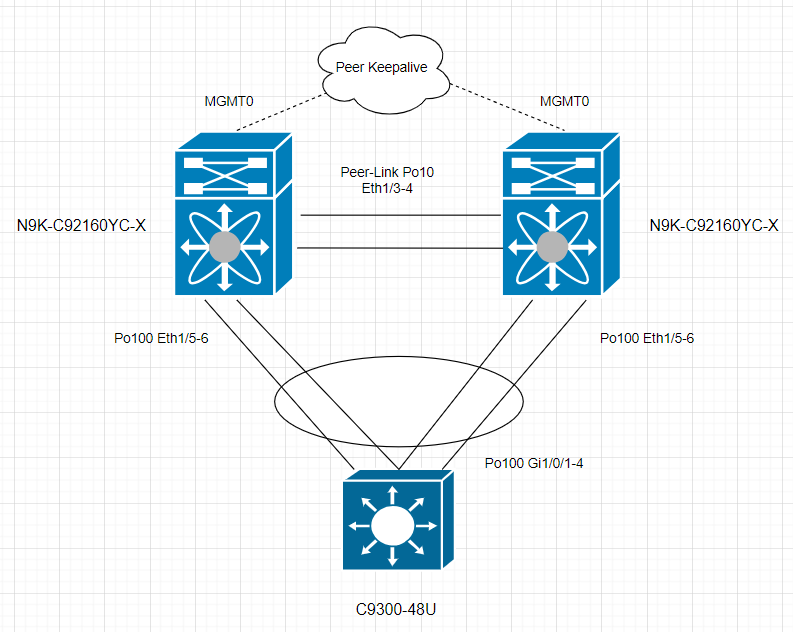
2. vPC Config
2.1 Enable vPC Feature
feature vpc

N9K-01# show feature | in vpc
vpc                    1          enabled
2.2 Configure vPC Peer-Keepalive Link
The management ports and VRF are the defaults. It’s recommended to use a separate VRF and a Layer 3 port from each vPC peer device in that VRF for the vPC peer-keepalive link. I use mgmt0 for peer-keeplive as 2 N9K are directly connected to a switch. The system does not form the vPC Peer-Link until a vPC peer-keepalive link is configured.
vpc domain 2
peer-keepalive destination 10.197.243.69

N9K-01# show vpc statistics peer-keepalive
vPC keep-alive statistics
----------------------------------------------------
peer-keepalive tx count:          67
peer-keepalive rx count:          50
average interval for peer rx:     1306
Count of peer state changes:      0
If a separate VRF and L3 port is used, the configuration should be as follows:
vpc domain 2
peer-keepalive destination xxx source xxx vrf xxx
2.3 Configure vPC Peer-Link
interface Ethernet1/3-4
  no shutdown
  channel-group 10 mode active

interface port-channel10
  switchport
  switchport mode trunk
  spanning-tree port type network
  vpc peer-link

N9K-01# show vpc bri
Legend:
                (*) - local vPC is down, forwarding via vPC peer-link

vPC domain id                     : 2
Peer status                       : peer adjacency formed ok
vPC keep-alive status             : peer is alive
Configuration consistency status  : success
Per-vlan consistency status       : success
Type-2 consistency status         : success
vPC role                          : primary
Number of vPCs configured         : 0
Peer Gateway                      : Disabled
Dual-active excluded VLANs        : -
Graceful Consistency Check        : Enabled
Auto-recovery status              : Disabled
Delay-restore status              : Timer is on.(timeout = 30s, 10s left)
Delay-restore SVI status          : Timer is off.(timeout = 10s)
Operational Layer3 Peer-router    : Disabled
Virtual-peerlink mode             : Disabled

vPC Peer-link status
---------------------------------------------------------------------
id    Port   Status Active vlans
--    ----   ------ -------------------------------------------------
1     Po10   up     1
2.4 Configure vPC System MAC / System Priority / Device Role
vpc domain 2
  role priority 500
  system-mac aa:bb:cc:dd:ee:ff
  system-priority 100

  vpc role preempt (it activates the role change.)

N9K-01# show vpc role

vPC Role status
----------------------------------------------------
vPC role                        : primary
Dual Active Detection Status    : 0
vPC system-mac                  : aa:bb:cc:dd:ee:ff
vPC system-priority             : 100
vPC local system-mac            : 7c:ad:4f:f2:1e:fd
vPC local role-priority         : 500
vPC local config role-priority  : 500
vPC peer system-mac             : 7c:ad:4f:f2:1f:4b
vPC peer role-priority          : 1000
vPC peer config role-priority   : 1000
If system priority are different on peer device, the peer link goes down.
2.5 Configure Downstream Facing Port-channel
If LACP is not used on the downstream host, just just use channel-group 100.
interface Ethernet1/5-6
  switchport
  switchport mode trunk
  switchport trunk native vlan 10
  switchport trunk allowed vlan 10,100-199
  channel-group 100 mode active
  no shutdown

interface port-channel100
  vpc 100
2.6 Configure Port-Channel on Downstream Device
interface range GigabitEthernet1/0/1-4
 switchport trunk native vlan 10
 switchport trunk allowed vlan 1,100-199
 switchport mode trunk
 channel-group 100 mode active

interface port-channel100

C9300-1#show etherchannel summary

Number of channel-groups in use: 1
Number of aggregators:           1

Group  Port-channel  Protocol    Ports
------+-------------+-----------+-----------------------------------------------
100    Po100(SU)       LACP        Gi1/0/1(P)      Gi1/0/2(P)
                                   Gi1/0/3(P)      Gi1/0/4(P)
3 vPC Check
N9K-01# show vpc brief
Legend:
                (*) - local vPC is down, forwarding via vPC peer-link

vPC domain id                     : 2
Peer status                       : peer adjacency formed ok
vPC keep-alive status             : peer is alive
Configuration consistency status  : success
Per-vlan consistency status       : success
Type-2 consistency status         : success
vPC role                          : primary
Number of vPCs configured         : 1
Peer Gateway                      : Disabled
Dual-active excluded VLANs        : -
Graceful Consistency Check        : Enabled
Auto-recovery status              : Disabled
Delay-restore status              : Timer is off.(timeout = 30s)
Delay-restore SVI status          : Timer is off.(timeout = 10s)
Operational Layer3 Peer-router    : Disabled
Virtual-peerlink mode             : Disabled

vPC Peer-link status
---------------------------------------------------------------------
id    Port   Status Active vlans
--    ----   ------ -------------------------------------------------
1     Po10   up     1


vPC status
----------------------------------------------------------------------------
Id    Port          Status Consistency Reason                Active vlans
--    ------------  ------ ----------- ------                ---------------
100   Po100         up     success     success


N9K-01# show vpc consistency-parameters vpc 100

    Legend:
        Type 1 : vPC will be suspended in case of mismatch

Name                        Type  Local Value            Peer Value
-------------               ----  ---------------------- -----------------------
delayed-lacp                1     disabled               disabled
mode                        1     active                 active
Switchport Isolated         1     0                      0
Interface type              1     port-channel           port-channel
LACP Mode                   1     on                     on
Virtual-ethernet-bridge     1     Disabled               Disabled
Speed                       1     1000 Mb/s              1000 Mb/s
Duplex                      1     full                   full
MTU                         1     1500                   1500
Port Mode                   1     trunk                  trunk
Native Vlan                 1     10                     10
Admin port mode             1     trunk                  trunk
STP Port Guard              1     Default                Default
STP Port Type               1     Default                Default
STP MST Simulate PVST       1     Default                Default
lag-id                      1     [(64,                  [(64,
                                  aa-bb-cc-dd-ee-ff,     aa-bb-cc-dd-ee-ff,
                                  8064, 0, 0), (8000,    8064, 0, 0), (8000,
                                  3c-13-cc-38-ac-0, 64,  3c-13-cc-38-ac-0, 64,
                                  0, 0)]                 0, 0)]
Allow-Multi-Tag             1     Disabled               Disabled
Vlan xlt mapping            1     Disabled               Disabled
vPC card type               1     N9K TOR                N9K TOR
Allowed VLANs               -
Local suspended VLANs       -     -                      -