Cisco C9500 StackWise Virtual
1. Prerequisites
Both switches in the Cisco StackWise Virtual pair must be:
- directly connected to each other.
- of the same switch mode.
- running the same license level.
- running the same software version.
- running the same SDM template.
- of the same port speed.
2. Configure StackWise Virtual
Device List
| Platform | C9500-24Y4C | C9300-48UB |
| Quantity | 2 | 2 (Stacked) |
| Version | 17.06.04 | 17.09.04 |
| License | DNA Advantage | DNA Advantage |
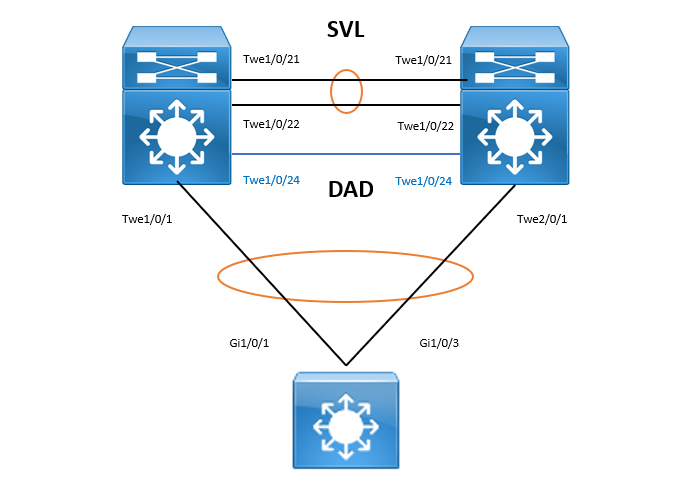
2.1 StackWise Virtual Base Config
Configure the StackWise Virtual Domain, SVL and DAD link. Reload both switches.
In my first lab test, I leave the 2ndswitch priority as default which is 1 and manually renumber the 2nd switch by switch renumber 2. In fact, I only need to configure different switch priority and let the stack choose the main and backup chassis.
C9500-1#
switch priority 15

C9500-1(config)#
stackwise-virtual
domain 2

interface range Twe 1/0/21,Twe 1/0/22
stackwise-virtual link 1

interface Twe 1/0/24
stackwise-virtual dual-active-detection

do write

C9500-1#
reload
C9500-2#
switch priority 14

C9500-2(config)#
stackwise-virtual
domain 2

interface range Twe 1/0/21,Twe 1/0/22
stackwise-virtual link 1

interface Twe 1/0/24
stackwise-virtual dual-active-detection

do write

C9500-2#
reload
If I reload the 1st switch and wait for 5 minutes, it reboots and wait for the peer to come up. Then I reload the 2nd switch. They both wait for each other to come up and perform the main chassis selection.
C9500-1# .......

Waiting for remote chassis to join
                                  #######################################################################################################################################################################################################################################################################################################################################################################

Chassis number is 1
When the system is up, the console to the 2nd switch is disabled.
C9500-2# .......

Waiting for remote chassis to join
                                  #############################################
                                                                               Chassis number is 2
All chassis in the stack have been discovered. Accelerating discovery


C9500-1-stby>
Standby console disabled
Configure BUM traffic optimization.
C9500(config)#svl l2bum optimization (default)

C9500#show platform pm l2bum-status vlan 1

Vlan      Physical  port forwarding count
----      --------------------------------

   1          6

C9500#show platform software fed switch ac fss bum-opt summary

FSS BUM Traffic Optimization Summary
====================================
Vlan 1: Opt en 0, svl added 1 l2tun 0 ECs:

Etherchannel 127: Local 0, Remote 0 Vlans:
Etherchannel 128: Local 2, Remote 0 Vlans:
Check StackWise Virtual status
C9500#show stackwise-virtual
Stackwise Virtual Configuration:
--------------------------------
Stackwise Virtual : Enabled
Domain Number : 2

Switch  Stackwise Virtual Link  Ports
------  ----------------------  ------
1       1                       TwentyFiveGigE1/0/21
                                TwentyFiveGigE1/0/22
2       1                       TwentyFiveGigE2/0/21
                                TwentyFiveGigE2/0/22

C9500#show stackwise-virtual link
Stackwise Virtual Link(SVL) Information:
----------------------------------------
Flags:
------
Link Status
-----------
U-Up D-Down
Protocol Status
---------------
S-Suspended P-Pending E-Error T-Timeout R-Ready
-----------------------------------------------
Switch  SVL     Ports                           Link-Status     Protocol-Status
------  ---     -----                           -----------     ---------------
1       1       TwentyFiveGigE1/0/21            U               R
                TwentyFiveGigE1/0/22            U               R
2       1       TwentyFiveGigE2/0/21            U               R
                TwentyFiveGigE2/0/22            U               R

C9500#show stackwise-virtual dual-active-detection
In dual-active recovery mode: No
Recovery Reload: Disabled

Dual-Active-Detection Configuration:
-------------------------------------
Switch  Dad port                        Status
------  ------------                    ---------
1       TwentyFiveGigE1/0/24            up
2       TwentyFiveGigE2/0/24            up
2.2 StackWise Virtual Additional Config
Configure ePAgP Dual-Active-Detection (Optional).
C9500(config)#
int range TwentyFiveGigE1/0/24,TwentyFiveGigE2/0/24
channel-group 1 mode desirable

stackwise-virtual
dual-active detection pagp trust channel-group
Actually EtherChannel can’t be configured under the DAD link.
C9500(config-if)#?
Distributed stack interface configuration commands:
  default            Set a command to its defaults
  description        Interface specific description
  exit               Exit from interface configuration mode
  no                 Negate a command or set its defaults
  stackwise-virtual  Configure Stackwise Virtual link values
Configure Port-Channel and Routing
C9500(config)#

int range Twe 1/0/1,Twe 2/0/1
no switchport
channel-group 1 mode active

interface port-channel 1
ip add 172.16.32.1 255.255.255.252

router eigrp 1
network 172.16.32.0 0.0.0.3
C9300(config)#

int range Gig 1/0/1,Gig 1/0/3
no switchport
channel-group 1 mode active

interface port-channel 1
ip add 172.16.32.2 255.255.255.252

router eigrp 1
network 172.16.32.0 0.0.0.3
Show Command Output
C9500#show etherchannel summary
Number of channel-groups in use: 1
Number of aggregators:           1

Group  Port-channel  Protocol    Ports
------+-------------+-----------+-----------------------------------------------
1      Po1(RU)         LACP        Twe1/0/1(P)     Twe2/0/1(P)

C9300#show etherchannel summary
Number of channel-groups in use: 1
Number of aggregators:           1

Group  Port-channel  Protocol    Ports
------+-------------+-----------+-----------------------------------------------
1      Po1(RU)         LACP        Gi1/0/1(P)      Gi1/0/3(P)

C9500#show ip eigrp neighbors
EIGRP-IPv4 Neighbors for AS(1)
H   Address                 Interface              Hold Uptime   SRTT   RTO  Q  Seq
                                                   (sec)         (ms)       Cnt Num
0   172.16.32.2             Po1                      14 00:04:47   38   228  0  7
3 Disable StackWise Virtual
C9500(config)#

int range Twe1/0/24,Twe2/0/24
no stackwise-virtual dual-active-detection

int range Twe1/0/21,Twe1/0/22,Twe2/0/21,Twe2/0/22
no stackwise-virtual link 1

no stackwise-virtual

C9500#

reload